• Skip to primary navigation
  • Skip to main content
  • Skip to primary sidebar
  • Home
  • News
  • Reviews
  • Organizing
  • Editing
  • Ideas
  • Explainers
  • Photo-editing A-Z
  • About

Life after Photoshop

  • Lightroom Classic
  • Capture One
  • Nik Collection
    • Analog Efex
    • Color Efex
    • Silver Efex
    • HDR Efex
    • Viveza
    • Sharpener
    • Dfine
    • Perspective Efex (retired)
  • DxO PureRAW
  • ON1 Photo RAW
  • Black and white

Nik Collection

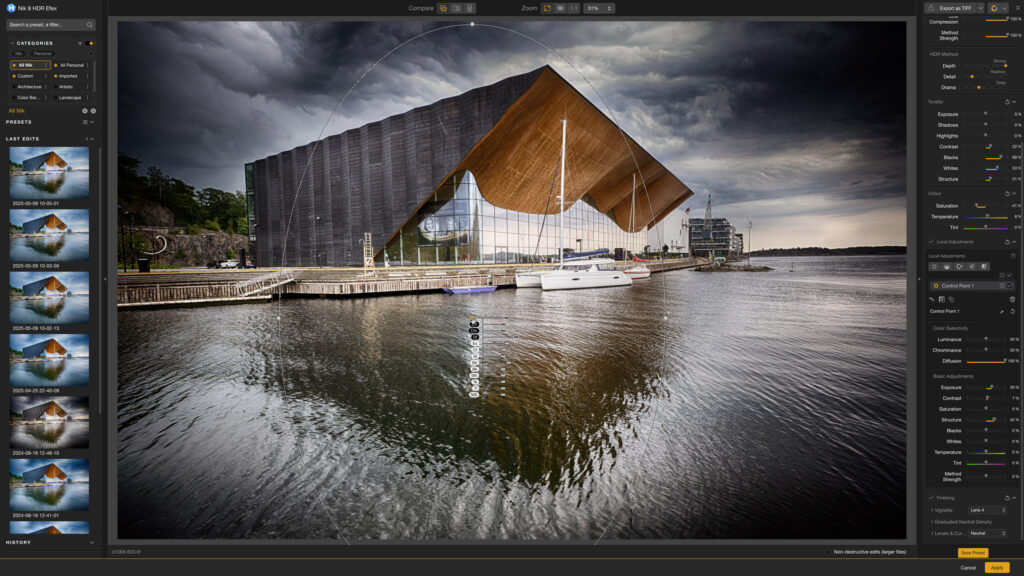
Nik Collection 8 HDR Efex
Nik Collection 8 HDR Efex. Image: Rod Lawton

The Nik Collection is an important collection of plug-ins once published by Nik Software but then taken over by Google when it bought the company. Google then made the Nik Collection free but it has now been bought for future commercial development by DxO.

See related articles below and read the full DxO Nik Collection review

How to create a red filter effect in Silver Efex Pro

August 25, 2013 by Life after Photoshop

Nik Software Silver Efex Pro red filter

Nik Software must have discovered some unknown digital alchemy when it developed Silver Efex Pro. Suddenly, here was a digital imaging tool that really could replicate the look, feel and even the ‘soul’ of silver-based black and white. And one of the favourite tools of traditional black and white photographers was the ‘contrast’ filter. These […]

Pages: Page 1 Page 2

Filed Under: TutorialsTagged With: Black and white, DxO, Nik Collection, Silver Efex

How to create your own processing recipe in Color Efex Pro 4

August 22, 2013 by Rod Lawton

Nik Software Color Efex Pro recipes

Color Efex Pro 4 doesn’t just boast a huge list of great filter effects, it also lets you ‘stack’ them in combination and then save your own, unique style as a ‘Recipe’. Nik Software really pulled out all the stops with Color Efex Pro 4. There were many useful additions and tweaks to the filters, […]

Pages: Page 1 Page 2

Filed Under: TutorialsTagged With: Color Efex, DxO, Nik Collection

How to create a fine art effect with Silver Efex Pro 2

August 18, 2013 by Life after Photoshop

Silver Efex Pro fine art

Fine art can mean a whole lot of different things, but here I’m just going to show how to turn a colour image into a simple graphic composition that could work quite nicely when you hang it on your wall. There are two things you need in order for this to work. One is an […]

Filed Under: TutorialsTagged With: Black and white, DxO, Nik Collection, Silver Efex

Ho to get an HDR effect from a single image in Color Efex Pro

August 15, 2013 by Rod Lawton

Nik Software Color Efex Pro Detail Extractor

There are so many filters in Color Efex Pro that it can take a long, long time to work out all the things that it can do. Some of the tools are obvious, like Levels and Curves or Graduated Filters, but some are less so, and the Detail Extractor is a prime example. It sounds […]

Filed Under: TutorialsTagged With: Color Efex, DxO, Nik Collection

How to save a preset for Kodak Tri-X black and white in Silver Efex Pro

August 11, 2013 by Life after Photoshop

Nik Software Silver Efex Pro Tri-X preset

Anyone who used to shoot with black and white film will have a favourite, and I always had a soft spot for Kodak Tri-X. I didn’t mind the grain because I liked that gritty, ‘documentary’ feel, and sometimes I push-processed during development to get a little more contrast, especially in the depths of the Northern […]

Pages: Page 1 Page 2

Filed Under: TutorialsTagged With: Black and white, DxO, Nik Collection, Silver Efex

Adding localised levels and curves adjustments in Color Efex Pro 4

August 8, 2013 by Rod Lawton

Nik Software Color Efex Pro levels and curves

DxO Color Efex Pro 4 isn’t just a collection of special effects. It also has a number of powerful image-editing tools hidden amongst them, and one of these is the Levels & Curves tool. You can use this to make adjustments to your images in the same way you would in Photoshop, Elements and other […]

Pages: Page 1 Page 2

Filed Under: TutorialsTagged With: Color Efex, DxO, Nik Collection

Use edge burning to enhance your composition in Silver Efex Pro 2

August 4, 2013 by Life after Photoshop

Nik Software Silver Efex Pro edge burning

Burning in the edges of your pictures is a great way to enhance the composition because it improves the picture’s overall contrast and helps you concentrate attention on the picture’s focal point. The point is that converting your pictures to black and white is just the start, and ‘digital’ techniques like channel mixing are useful […]

Filed Under: TutorialsTagged With: Black and white, DxO, Nik Collection, Silver Efex

How to create a moonlight effect in Color Efex Pro 4

August 1, 2013 by Rod Lawton

Nik Software Color Efex Pro Midnight filter

If you look at any old Hollywood film you’d see they had a standard technique for creating ‘moonlight’. They’d simply shoot in bright sunlight, reduce the exposure and give the picture a blue tinge. The bizarre thing was that it worked – it did give the appearance of ‘night’. Moonlight isn’t actually blue, though. If […]

Filed Under: TutorialsTagged With: Color Efex, DxO, Nik Collection

How to stack filters in Color Efex Pro 4

July 22, 2013 by Rod Lawton

Nik Software Color Efex Pro combining filters

Color Efex Pro 4 (part of the DxO Nik Collection) doesn’t just apply individual filters – you can also combine, or ‘stack’ filters to create a cumulative effect. I’ve used it here to add a warm, dreamy glow to this minimalist landscape in order to show how this  stacking system works. The start shot is […]

Filed Under: TutorialsTagged With: Color Efex, DxO, Nik Collection

Boost contrast with Silver Efex Pro’s vignettes

July 18, 2013 by Life after Photoshop

Nik Software Silver Efex Pro vignette

The old-fashioned art of black and white photography went far beyond the initial picture-taking. Another, equally important creative process took place in the darkroom, where the image was dodged and burned to enhance the tones and concentrate the viewer’s gaze on the subject and composition. Dodging and burning is a bit of a lost art. […]

Filed Under: TutorialsTagged With: Black and white, DxO, Nik Collection, Silver Efex

  • « Go to Previous Page
  • Page 1
  • Interim pages omitted …
  • Page 6
  • Page 7
  • Page 8
  • Page 9
  • Go to Next Page »

Primary Sidebar

Subscribe for more!

Just enter your email address to subscribe to Life after Photoshop and receive notifications of new tips, how-tos and reviews by email.

Get DxO Nik Collection 8: save up to 15% with code LAP15 (new users only)

DxO Nik Collection 8

Adobe Lightroom: what is it, where do you get it, what does it cost in 2026?

Adobe Lightroom is not one program but three. You could … [Read More...] about Adobe Lightroom: what is it, where do you get it, what does it cost in 2026?

The best photo editing software for organizing, editing, RAW and effects

Choosing the best image editing software used to be easy. … [Read More...] about The best photo editing software for organizing, editing, RAW and effects

Layers explained

Layers explained: what they do and how to use them

Layers are a central part of many photo editing processes, … [Read More...] about Layers explained: what they do and how to use them

BAN adjustments… Basic And Necessary image corrections to do first

Photo editing software does two quite different jobs. It can … [Read More...] about BAN adjustments… Basic And Necessary image corrections to do first

More Posts from this Category

Mission statement

Life after Photoshop is not anti-Photoshop or anti-subscriptions. It exists to showcase the many Photoshop alternatives that do more, go further, or offer more creative inspiration to photographers.

Affiliate links

Life after Photoshop is funded by affiliate links and may be paid a commission for downloads. This does not affect the price you pay, the ratings in reviews or the software selected for review.

Contact

Email lifeafterphotoshop@gmail.com

Copyright © 2026 Life after Photoshop · News Pro on Genesis Framework · WordPress · Log in

We use cookies to ensure that we give you the best experience on our website. If you continue to use this site we will assume that you are happy with it.